
Stairs feel steeper than they used to?
Get stronger at home in 10 minutes a day. No gym, no equipment, no jumping — just hold a simple position and breathe. IsoCore guides you and raises the load at your pace.


14-day full-access trial · no card required

Does this sound familiar?
In everyday life
Stairs and getting up from a low chair take more effort than they used to.
Your back feels stiff after a day at the desk or in the car.
Putting on socks standing up has become a balancing act.
Shopping bags feel heavier, and so does a grandchild in your arms.
You feel tired from sitting all day, but not from moving.
Why it never quite starts
The gym is a trip across town, a membership and loud music. Not really your place.
Fitness videos are too fast: jumping, burpees, and a trainer half your age.
You don't know where to start, and you're afraid of overdoing it.
You've started before, missed a week, and the streak was gone.
That's normal. Strength can be built back gently, and you can do it at home.
A calmer way to get stronger at home
IsoCore is built on isometric exercises: you hold a simple position — against a wall, at a table, on a chair — and breathe. No fast movements, no jumping. 5 to 15 minutes in your living room, whenever it suits you.
No gym, no commute.
Your living room is enough — no schedule, no travel, no one watching.
No club contract.
Pay monthly, yearly or once, right in the app. Cancel any time.
Almost no equipment.
A wall, a chair or a table. A few exercises use a tennis ball or water bottles.
No jumping, no rush.
Calm holds you can do in everyday clothes.
At your pace.
You start with 10 seconds. The app adds time only when it feels easy.
| Gym | Fitness videos | IsoCore | |
|---|---|---|---|
| Where | Across town | At home | At home |
| Cost | Membership | Free or paid | 14-day trial, then a plan |
| Pace | Trainer's pace | Video's pace | Your pace |
| You need | Machines, weights | Space to jump, a mat | A wall or a chair |
| Who adapts | You adapt to it | You adapt to it | It adapts to you |
Everyday goals, simple holds
Each hold works the muscles behind a daily task.
Stairs and getting up from a chair
Wall sit · Calf raise · Glute bridge

Steady on your feet
One-leg stand with support · Heel-to-toe stand
Sitting and standing up straight
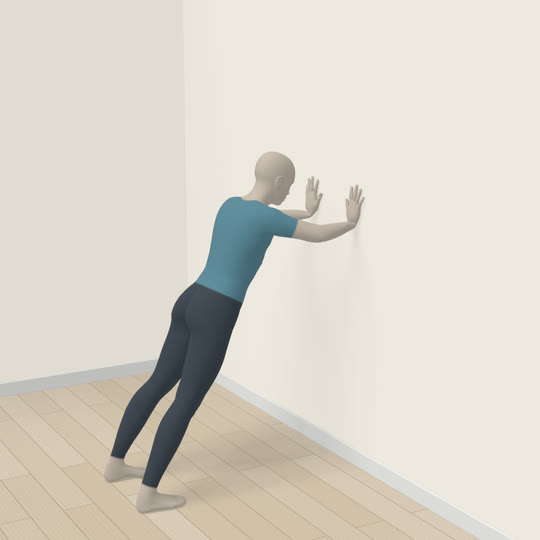
Wall plank · Table plank · All fours: arm and leg

Carrying bags, lifting things onto a shelf
Wall push-up · Arms out to the sides

Opening jars, a firm grip
Tennis ball squeeze · Soft ball squeeze

Less tension in your neck after screens
Forehead press · Temple press
28 exercises, most of them in 2–3 levels — from very gentle to really challenging.
How it works
Get today's set
Wall sitCalf raiseWall plankOne-leg stand with supportForehead pressEvery day a new set of 3, 5 or 7 exercises for legs, core, arms, neck, hands and balance. Want a change? Edit the plan: remove, add or reorder exercises.
Hold with the timer
The video shows the position, sound and vibration mark the start and end of each hold. Put the phone down — no need to watch the screen. Your music keeps playing.
Say how it felt
Easy, okay or hard — the app adjusts the hold time for next time.
Start at 10 seconds. Grow at your own pace.
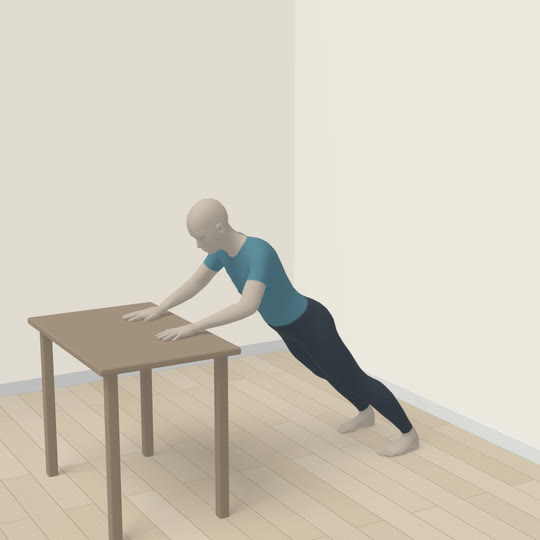
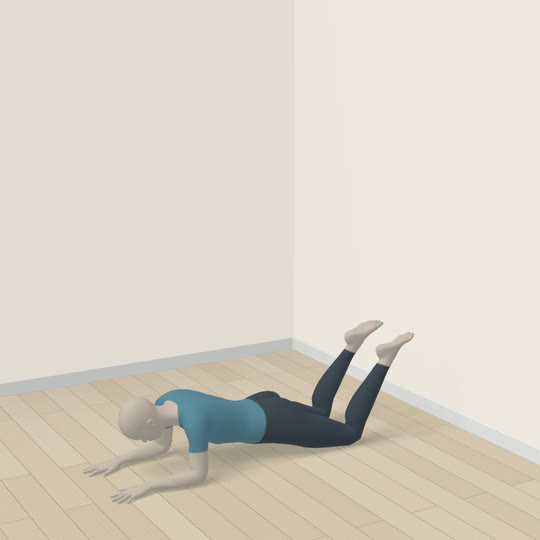
Most exercises start with 3 sets of 10 seconds. Two "easy" answers in a row — plus 5 seconds. "Okay" — it stays the same. "Hard" twice in a row — minus 5 seconds. Once you reach the top hold, the app suggests a harder version: plank against a wall, then at a table, then on your knees.
- Wall plank
- Table plank
- Knee plank
Wall sit · hold time
A month ago you held Wall sit 10 s, now 35 s.
Made around you
Go easy on knees, back or neck — exercises with heavy load there are left out.
No floor exercises if you prefer — standing or on a chair only.
An exercise doesn't suit you? Mark it, and it leaves your sets or switches to an easier version. You can bring it back in Settings.
Optional warm-up before and cool-down after, about 2 minutes each.
A weekly goal, not a streak
Choose how many workouts a week suit you — from 1 to 7. Miss a day, and nothing resets.
3 of 3 this week
Your workouts stay on your phone. No account, no sign-up.
Works offline after the first download.
English, Deutsch, Čeština, Русский, Français, Español, Türkçe.
Try full access for 14 days
No card needed. After the trial, choose a plan to keep training — your history and progress stay either way.
Monthly
renews every month
Yearly
renews every year
Lifetime
pay once
Prices for your country are shown in the app. Subscriptions renew automatically; cancel any time in your App Store or Google Play settings.
Questions
I haven't exercised in years. Is this for me?
Yes. You start with short holds of about 10 seconds and easier versions; the app adds time only when you say it was easy.
Do I need equipment?
No. A wall, a chair or a table is enough for most exercises. A few use a tennis ball or water bottles.
Can I really get stronger without a gym?
For everyday strength — stairs, getting up, carrying, balance — yes: holding a position works your muscles without weights. You do it at home, on your schedule, and the load grows as you get stronger.
How long is a workout?
About 5 to 15 minutes, depending on the set length you choose and whether you add the warm-up and cool-down.
Do I have to look at the screen?
No. Sound and vibration tell you when to start, switch sides and rest.
Where is my data stored?
Only on your device, with no account. It's included in your phone's regular backup. Anonymous usage statistics stay off unless you turn them on.
Is it safe for me?
IsoCore is a fitness app, not medical advice. If you have any health concerns, talk to your doctor before you start. Breathe evenly during holds — the app reminds you on screen.
Ready for your first 10 seconds?
Start today with 10 seconds — the app adjusts the load to you from there.
14-day full-access trial · no card required